Can You Take a Phone Gimbal on a Plane? Carry-On Battery Rules
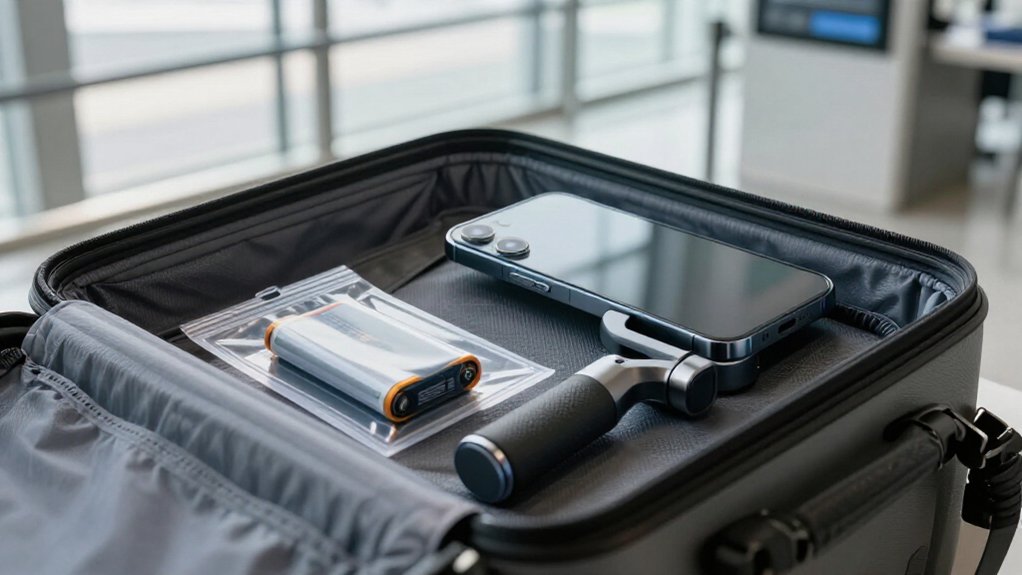
Yes, you can take a phone gimbal on a plane, but pack every spare lithium battery in your carry-on, never checked luggage.
Keep an installed battery in the gimbal if you check it, but remove loose spares first.
Protect each spare’s terminals in its case or with tape.
Check its watt-hour label; airline limits and approval rules vary.
Fold the gimbal within your airline’s size limit and expect possible security inspection.
Learn what to check before departure.
Lithium Battery Carry-On Rules
Carry your phone gimbal’s lithium batteries in your carry-on, and protect each spare individually in its original case or with taped terminals to prevent short circuits.
Check the watt-hour (Wh) rating on each battery’s label before you travel. You can typically carry up to four spare batteries rated under 100 Wh in your carry-on. Batteries rated from 100 to 160 Wh are generally limited to two spares. If a spare falls between 160 and 300 Wh, contact your airline or its Special Assistance team beforehand; don’t assume approval.
Most phone gimbal batteries fall under 100 Wh, but verify the label rather than guessing. You may pack chargers in either your carry-on or checked bag. Always keep loose battery spares in your carry-on, as required.
Gimbal Battery Placement Rules
Beyond watt-hour limits, where you pack each battery matters: keep spare lithium batteries in your carry-on, never in checked luggage, and protect each one from short circuits with its case or covered terminals.
If your gimbal has an installed battery, you can generally pack it in either bag, though carry-on keeps it accessible and safer. Remove loose batteries before checking the gimbal.
Check each battery’s Wh rating and your airline’s spare limit before packing: under 100 Wh generally permits up to four spares; 100-160 Wh, up to two. Some airlines cap medium-size spares at two. For 160-300 Wh, contact your airline or Special Assistance first. Protect each spare from contact with metal objects.
| Battery status | Where it goes |
|---|---|
| Spare | Carry-on only |
| Installed | Carry-on preferred |
Airport Security Screening�
A phone gimbal is generally allowed through TSA screening, but officers may inspect it or decide whether it can proceed based on its X-ray image.
Before you enter the checkpoint, make sure any removable lithium battery is in your carry-on; if it’s a spare, remove it from the gimbal. Keep spare batteries’ terminals individually protected in their cases or with tape over the contacts. This helps prevent short circuits and supports safe handling if officers examine your belongings.
Follow the applicable limits: you can typically carry up to four spares under 100 Wh, or up to two from 100 to 160 Wh. For a battery from 160 to 300 Wh, contact Special Assistance beforehand. Don’t place lithium batteries or spares in checked luggage. If screening staff ask to inspect the gimbal or its battery, cooperate and follow their directions; the officer makes the final screening decision at the checkpoint.
Gimbal Size and Fit
Check your gimbal’s folded dimensions before packing, then confirm your bag meets your airline’s carry-on size limits. A compact model generally fits when your bag stays within those limits, often about 22 × 14 × 9 inches on U.S. carriers.
Pack it securely but accessibly so you can remove it for inspection without putting pressure on its mount or motors.
Folded Gimbal Dimensions
When folded flat in your camera backpack, a phone gimbal should fit within your airline’s carry-on size limit, often about 22 × 14 × 9 in (56 × 35 × 23 cm), to reduce the risk of gate-checking. Measure it with the handle collapsed and accessories attached; listed dimensions may exclude protruding clamps or grips. Check dimensions and fit.
Keep the folded profile compact and recognizable. TSA generally permits gimbals as camera accessories, but an unusual shape may prompt inspection or questions. Make the device identifiable alongside your phone or camera gear. Folding it doesn’t change lithium-battery rules: carry batteries in the cabin and individually protect loose spares.
Carry-On Bag Fit
In your carry-on, secure the gimbal in a side pocket, often without its case, where other items won’t crush it; airlines don’t set special size limits for gimbals. Keep any gimbal with an internal battery or detachable pack in your carry-on, not checked luggage. If you remove a battery, protect its contacts individually in its case or with tape to prevent a short circuit. Pack the device where you can reach it; if TSA asks, remove it for screening so officers can identify it clearly.
| Fit check | Your action | Security benefit |
|---|---|---|
| Side pocket | Keep it clear | Less crushing |
| Battery | Carry onboard | Lithium compliance |
| Screening | Present on request | Easier identification |
Before packing, check that the folded handle and phone clamp sit snugly and securely, with no pressure on controls or moving joints during transit.
Airline Size Limits
Although airlines don’t set special size limits for phone gimbals, you should pack yours as a small electronic accessory and keep it within your airline’s carry-on allowance.
Most U.S. airlines use a carry-on target of about 22 × 14 × 9 inches (56 × 35 × 23 cm). Make sure your gimbal, including its case or padding, fits inside that envelope. Measure it before you leave, and check your carrier’s current rules because limits can vary.
If your model has removable lithium batteries, keep the gimbal in your carry-on and follow the battery’s watt-hour limits. Carry spare batteries in the cabin, not checked baggage. Common allowances include up to four spares under 100Wh, or two rated 100–160Wh; batteries from 160–300Wh may need airline approval. Protect terminals in original cases or with tape.
Airline-Specific Baggage Policies
Check your airline’s size limits before packing your gimbal, since carry-on rules vary. Review its battery policy by checking each battery’s watt-hour rating, and keep removable spares in your carry-on with protected terminals.
Confirm gate-check procedures, too, so you can remove spare batteries before your bag is checked.
Check Airline Size Limits
Before packing your gimbal, confirm your airline’s carry-on and personal-item size limits; many carriers cap carry-ons at about 22 × 14 × 9 in (56 × 35 × 23 cm). Measure your backpack when packed, including side pockets; an oversized bag may be stopped at check-in or the gate. Don’t assume a camera case or device bag gets an exemption: your carrier may count it toward the same allowance.
Check whether the airline classifies it as a carry-on or personal item, then compare its packed dimensions with that category’s rules. If it won’t fit, ask about gate-checking before boarding, but don’t rely on approval; staff decide how to handle oversized items. Confirm any gimbal-related carry-on-only restrictions separately; size compliance doesn’t override airline requirements.
Review Battery Rules
Because gimbal batteries can trigger different limits by airline and size, check your carrier’s current policy before you travel. Track each battery’s watt-hours and whether it’s attached to the gimbal. Keep spare lithium batteries in your carry-on only, with terminals protected in cases or tape. Chargers may go in either bag.
| Battery rating | Spare allowance |
|---|---|
| Under 100 Wh | Up to 4 |
| 100-160 Wh | Up to 2 |
| 160-300 Wh | Airline approval |
United and American generally cap medium spares at two and bar detached lithium batteries from checked bags. American allows up to two batteries, plus two detached, per device in attached-battery setups. Over 300 Wh is typically prohibited.
For checked gimbals, check your carrier’s limits when a small or medium battery remains installed. Verify the Wh marking; get required approval before travel.
Confirm Gate-Check Policies
At the gate, your airline may treat a phone gimbal or camera backpack differently from a tripod or rigid camera case, so confirm its policy for your specific flight.
Check whether gate-check rules cover soft bags or only rigid cases, and ask if your gimbal can stay with you. Carry it onboard if you want to avoid separation from your electronics. Keep every detachable lithium battery and spare in your carry-on; gate-checking doesn’t change battery rules. You can usually check chargers.
At the gate, size and shape limits may apply, and equipment that resembles a tool may draw scrutiny. Pad the gimbal or use a clear bag, then explain that it’s camera stabilization equipment if asked. Before boarding, verify the carrier’s current instructions.
Filming During Layovers
You can film with your phone gimbal during a layover once you’ve cleared security, provided the airport permits it. Keep your gimbal and spare batteries in your carry-on, especially if you must pass through another checkpoint or re-clear security.
Before screening, store each spare battery separately in its original case or cover its terminals with tape to prevent a short circuit. If an officer asks, identify the gimbal as a camera accessory and point out where you’ve packed its batteries.
Follow checkpoint instructions and airport rules, and don’t film in posted restricted areas or where staff prohibit recording.
For batteries under 100 Wh, you can usually carry up to four spares; 100–160 Wh batteries generally need airline approval and are limited to two.
Damaged Battery Restrictions
Even if your phone gimbal’s battery is normally permitted, don’t fly with it if it’s swollen, leaking, or has a damaged casing. Screening staff may treat a compromised lithium-ion battery as unsafe and confiscate it. Don’t pack it in your carry-on or checked bag; checked compartments raise short-circuit and fire concerns. Replace the battery or follow airline or airport disposal guidance. Taping terminals won’t make a physically damaged battery safe; treat the entire battery as hazardous and seek proper handling.
| What you notice | Your safest move |
|---|---|
| Swelling | Stop packing it |
| Leakage | Keep it out |
| Casing damage | Don’t tape terminals |
| Suspected damage later | Ask security |
After your trip, if you suspect damage, keep the battery away from metal objects and contact airline or airport security guidance before flying again. A rejected battery can disrupt your plans, but carrying a hazard could put others at risk.
Charging a Gimbal In-Flight
If the airline permits it, you can charge your gimbal in flight using the aircraft’s USB port or power outlet. You may use only approved onboard power; don’t connect to unauthorized equipment or assume every seat has a port. Keep removable gimbal batteries with you in carry-on, and carefully protect each spare battery’s terminals individually.
- Check airline instructions before plugging in; crew directions take priority.
- Keep cables tidy and clear of aisles and exits.
- Don’t charge a damaged battery or leave the gimbal unattended.
- Expect security staff to inspect or swab electronics; cooperate calmly.
Keep loose lithium spares in carry-on; chargers aren’t spare batteries.
Generally, airlines allow four spares up to 100 Wh, two at 100–160 Wh; larger packs need airline assistance.
Photograph Your Battery Label
A clear battery-label photo can speed up checks and help you confirm your gimbal’s carry-on limits. Take a picture of the label on the gimbal or battery, making sure its watt-hour (Wh) rating is readable. Airlines assess lithium battery limits by Wh, not by device type, so don’t rely on the product name alone.
For batteries under 100Wh, rulesets generally allow up to four spares in your carry-on, with terminals protected. At 100-160Wh, the limit is two spares, and your airline may require approval. If any battery is 160-300Wh, contact Special Assistance before travel; that range isn’t typical for phone gimbals.
Keep all spare lithium batteries in your carry-on only, and cover terminals with a battery case or tape to prevent short circuits.
Conclusion
Before you fly, check your gimbal’s battery rating and your airline’s current rules. Keep spare lithium batteries in your carry-on, protect their terminals, and don’t pack damaged batteries. At security, remove the gimbal if officers ask, and follow screening instructions.
Confirm the device fits your bag, then stow it safely during the flight. If you’re unsure about a battery label or limit, contact the airline before departure. A quick check helps you avoid delays and travel safely.