L-Bracket vs Arca-Swiss Plate: Is the Upgrade Worth It for Vertical Shots?
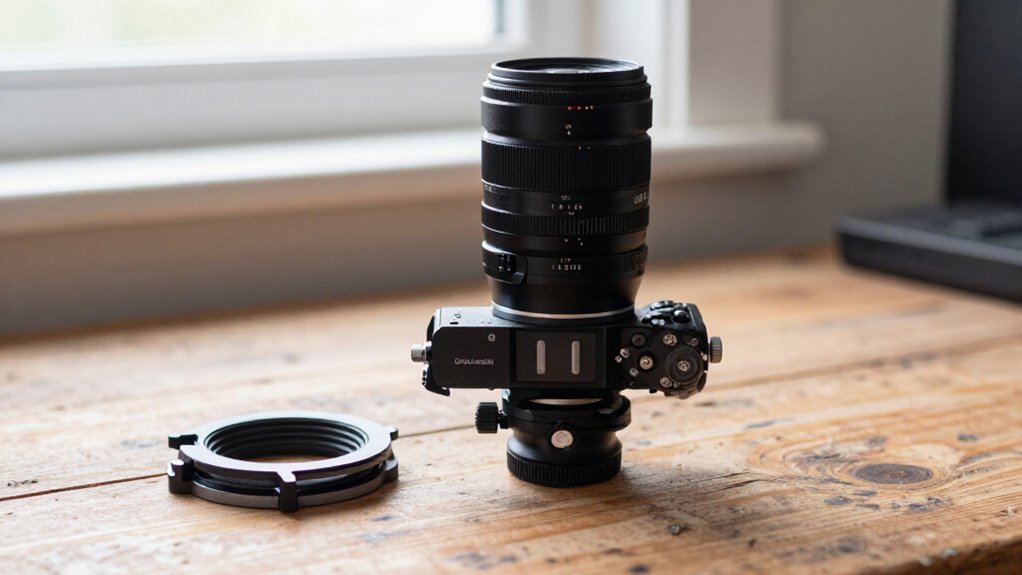
An L-bracket is worth upgrading if you shoot vertical often and want centered framing without tipping your camera beside the tripod head. Its side dovetail lets you switch orientation in the same Arca clamp, keeping the camera closer to the support axis and reducing balance shifts.
A standard plate costs less but usually requires rotating the head. Before buying, check clamp fit, screen and battery-door clearance, and cable access. Further checks can guide your choice.
Centered Vertical Composition
For centered vertical shots, an Arca-Swiss plate usually requires you to rotate the head and shift the camera to the side, making precise framing harder. An L-bracket keeps the camera’s center of gravity closer to the tripod apex, so you can maintain a centered composition in portrait and landscape orientations. That positioning also supports repeatable framing and steadier balance, particularly with heavier bodies and lenses.
With a standard plate, your portrait setup may sit slightly angled, and the side-shift can make alignment less consistent.
| Setup | Practical result |
|---|---|
| Standard plate | Side-shift complicates centering |
| L-bracket | Center stays near apex |
| Either orientation | Repeat framing more easily |
Choose the L-bracket when centered vertical framing matters across repeated shots; it reduces the need to correct composition and keeps support more directly beneath the load. If you use lighter gear or rarely shoot portrait, the standard plate may remain adequate, but expect less consistent centering.
Vertical Mounting Mechanics
When you mount a camera vertically with a standard bottom plate, you must rotate the tripod head and tip the camera to the side, which can leave it off true vertical and shift its weight away from the head’s support axis. That position can limit fine adjustment because the camera beside the ball head may reduce usable framing movement.
An L-bracket provides an Arca-style dovetail along the camera’s side while its lower arm remains attached beneath the body. To switch orientation, release the clamp, reposition it on the side rail, and secure the camera without rotating the head. You can then keep the camera aligned over the tripod apex and preserve the same head orientation. Verify the bracket seats fully in your clamp.
Portrait-Orientation Stability
The side rail’s main advantage in portrait orientation is a steadier load path: an L-bracket keeps the camera’s center of gravity close to the tripod head axis, while a standard Arca plate usually forces the camera to hang off to one side. That offset applies torque outside the head’s normal loading axis, which can make a ball head less secure, especially with a large, gripped body. The side rail supports the camera without that cant, helping you preserve a consistent load path and alignment.
Arca-compatible dovetail rails can clamp rigidly in either orientation; a wide, fully seated footprint also helps limit twist. If you notice flex or rotation, inspect the clamp-to-plate interface and any material between the plate and body. A portrait mount with broad, solid contact can improve stability, but only when the clamp and plate fit properly. Check that fasteners stay tight and that the camera sits flush; a secure connection matters more than the bracket’s label when you load heavy lenses or accessories.
Quick Portrait Reframing
An L-bracket speeds portrait reframing by letting you move the Z9 from landscape to vertical in the same Arca clamp without rotating the tripod head or hanging the camera off to one side. With a standard plate, you must loosen and rotate the ball head, then remount the camera; this can leave the Z9 slightly angled and slow leveling and composition. A vertical rail gives you portrait geometry while keeping the camera’s center of gravity over the tripod, avoiding the off-axis load of side-hanging.
To reframe, release the camera and slide its dovetail into the clamp’s vertical position; you retain repeatable alignment and work faster without adjusting the head. Check that your bracket leaves the Z9 battery door accessible and screen articulation unobstructed.
Clamp Jaw Length Requirements
Check your clamp’s jaw length against the L-bracket’s dovetail: the jaws must fully grip the vertical leg, not just the horizontal plate, to reduce the risk of slipping in portrait orientation. Before mounting, rotate your camera into portrait position and confirm both jaws contact enough of the vertical dovetail to hold it securely.
If the jaws cover only a short section, the plate may shift under load, a limitation of Arca-style clamps that don’t fully engage. Check the plate’s dovetail length and width; a wider surface can provide more contact and resist twisting.
For example, Wimberley’s three-inch width and end stops offer clamping surface. If your clamp doesn’t match the L-bracket’s geometry, choose a matching clamp or a bracket with a wider dovetail.
Replacing Worn Clamp Pads
When worn clamp pads lose their grip, replacing them can restore the bite that keeps an Arca plate and a heavy body like the Z9 from creeping or twisting as you tighten the clamp. Inspect each pad for damage or uneven contact; with a larger body such as the Z9, poor contact can allow micro-shifts that show as framing drift during long exposures.
Replacement pads should match the originals’ thickness and shape so the clamp reaches full lock-up and built-in retention works as intended. After installation, clamp your plate and apply light side force to test twist resistance. Even a two-inch top surface still depends on sound pads. Recheck battery-door access and screen clearance; small shifts can interfere with articulated screens or side panels.
Clamp Compatibility Issues
Replacing worn pads restores grip only if your clamp and L-bracket use compatible profiles. Most photographers already own Arca clamps, so choose an L-bracket with the same Arca-style 1.5-inch RRS dovetail profile to integrate it without replacing gear. Don’t assume every quick-release system is interchangeable: Arca-Swiss and Manfrotto RC2 parts may both work, yet their profiles differ.
If your head won’t accept Arca plates directly, as with some Gitzo ball heads, add an Arca adapter or clamp; this lets the bracket drop into your setup. Before buying, check portrait-mode clearance between the camera body and clamp hardware, including whether the screen can articulate fully. Compare cost and construction, too: Kirk-style brackets can be expensive, while SunwayFoto offers a design at roughly half the price.
L-Bracket Clearance for Cables
On the Z9, check that the L-bracket’s upright section leaves the side ports and cable plugs accessible. Route cables in front of or behind the bracket leg, and confirm they don’t snag as you tilt the screen.
With the camera clamped in vertical position, test each connected cable through the screen’s full articulation range.
Cable Port Access
Cable access matters with a Z9 L-bracket because its edge can sit close to the camera’s side doors in portrait orientation.
When you choose a modular plate, check that its shape leaves the battery and I/O panels usable. You should be able to open and close both without removing the camera from the Arca clamp.
That access preserves the bracket’s practical benefit and avoids interrupting a shoot.
If you use external power or tethered connections, test the actual cable plugs in place. Confirm the bracket doesn’t crowd the ports or force cables into a sharp bend as they exit. Strap-loop openings and cutouts may also affect routing.
Finally, check that the camera seats securely on the clamp and that the bracket resists twist well.
Full Articulation Clearance
Check the Z9’s full screen articulation before choosing an L-bracket: some designs can limit the LCD’s leftward tilt or leave its edge protruding beyond the camera body.
When evaluating a Z9 bracket, check whether the screen’s left/right tilt arc clears the bracket’s leg and the battery/access side panels. If you use the vari-angle LCD for left-tilting shots, compare interference with your articulation range; reports note this limitation, but its significance depends on your workflow.
Also check the bracket’s side profile around connected accessories, including ports and cables, while preserving access to the battery door. For a practical test, mount your camera and bracket on the Arca clamp, connect your usual cables, then carefully sweep the screen through its full articulation positions. Confirm it moves freely without binding or pinching cables.
Cable Clearance Considerations
With an L-bracket, rotating your Nikon Z9 vertically can constrain side-port cables, so check clearance around the battery door and access panels. Make sure the bracket and clamp don’t press cables against the tripod head or rail, which can restrict screen movement or tug connectors.
Route cables with slack, then tilt the screen left and right to confirm they stay clear.
Ports in Vertical Orientation
In portrait orientation, an L-bracket can place the Z9’s side ports closer to the tripod head and clamp, so choose a modular plate with explicit side-port access panels and clearance for the battery door. Before buying, compare the plate’s openings with your cable plugs and battery-door swing; nominal access may still leave a tight bend.
- Seat the camera vertically; check whether the clamp crowds each connector.
- Route a cable, then confirm its plug clears the bracket without strain.
- Open the battery door fully; verify the cutout preserves its travel.
- Articulate the screen with cables connected; watch for contact or restricted movement.
Also test a strap alongside cables: neither should snag or flex. This confirms ports remain usable; you won’t sacrifice centered, stable mounting.
Side Panel Access
For side-panel access, verify that an L-bracket leaves the Z9’s battery door and port panels free to open fully. Some bracket edges sit close enough to restrict a panel’s swing, so test the door with the camera mounted. Z9-specific modular L-plates are shaped around the body’s access points; they can let you reach the battery and ports without removing the plate or camera.
Check the screen’s tilt: its movement may meet the bracket’s vertical leg. If access feels cramped, an RRS-style plate profiled for the Z9 may suit better than a generic Arca-only design. A standalone Arca-Swiss base plate leaves hardware unobstructed because it has no vertical leg, but portrait framing requires rotating the head. Confirm access and screen movement in both orientations.
Cable Strain and Clearance
An L-bracket keeps the Z9 upright on the tripod head for portrait shots, reducing the need to twist the body and potentially snag or stretch connected cables.
- Still check the swap: strap loops and HDMI, USB, or trigger leads can rub the plate edge, while tight bends at the battery-door side may strain connectors.
- Z9-specific brackets have cutouts for ports, but verify your connector clears the vertical leg at your widest articulation angle.
- With a standalone plate, rotating the head changes cable routing more and can pinch a lead against the head housing.
- Before committing, mount your lens and test landscape-to-portrait movement in the cable-stressed position. Confirm no lead pulls at its connector, and your battery or access panel stays reachable without dislodging routing.
Shop-Specific L-Brackets
If you need proper portrait orientation on a tripod, compare the Nikon Z9-specific options closely: Kirk’s bracket is well made but pricey, while SunwayFoto offers a less expensive option with broadly similar fit and engineering.
Some Chinese knockoffs may not save much, since their prices can approach Kirk’s. If you need dependable access to the Z9’s battery and access panels, consider RRS’s modular L-plate; users value its solid fit and panel compatibility.
Before ordering any model, check how its side section interacts with the screen. Certain brackets limit the screen’s leftward tilt, which can matter for low or waist-level framing.
Confirm clearance across the full range you use, and verify that the plate fits your camera and tripod clamp. Compare total cost, access, and articulation—not price alone—so you choose the bracket that suits your vertical-shooting setup. You’ll also want to test the plate with your preferred lens and confirm controls remain reachable during portrait orientation before you buy one.
Conclusion
An L-bracket is worth the upgrade if you shoot portraits often, need a centered vertical composition, or want to reframe quickly without shifting your tripod head. Before buying, verify clamp jaw length, Arca-Swiss compatibility, and clearance for your camera’s cables.
A standard plate costs less and may suit occasional vertical shots, but it can make mounting less stable and convenient. Choose the setup that matches your camera, tripod, and workflow—not the one with more features.