Motorized vs Manual Camera Slider: Is Automation Worth the Price?
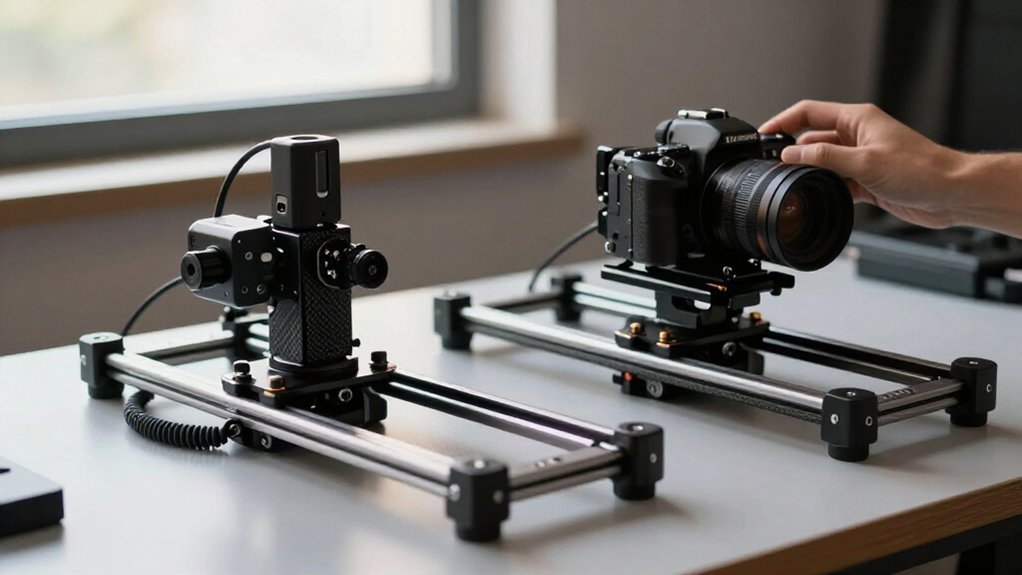
A motorized camera slider is worth the premium if you need repeatable A-to-B moves, precise speed, or automated time-lapses. It can hold consistent endpoints and pacing for product shots, VFX, and long intervals, while manual operation costs less and lets you shape motion by feel.
Choose manual for flexible single takes; choose motorized for automation, but budget for batteries and check payload and lens clearance.
Details below help you choose a setup for your workflow.
Manual vs. Motorized Cost Snapshot
If you only need occasional camera moves, a manual slider is the cheaper option; you’re paying more for motorization when repeatable A-B moves, adjustable speed, and timed operation matter.
Use this snapshot to match the premium to your workflow:
| Factor | Manual vs. motorized |
|---|---|
| Entry price | Manual setups cost less; motorized units cost more. |
| Repeatability | Motorized A-B memory repeats starts and stops. |
| Timing | Speed control and timed moves support long takes. |
| Extras | Shutter triggering and app control add convenience. |
That premium can buy moves lasting 17 to 184 seconds, saving hours of hand-timed operation on sequences. If you record audio, check noise ratings: models advertise 26.8–27.3 dB at one meter. App-based workflows cost extra, so choose them when control matters; a motorized model may cover your needs.
Manual Push vs. Motor Drive
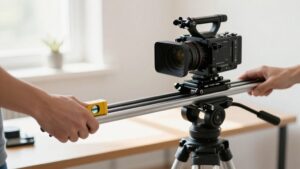
Price tells you what motorization costs; the move itself shows what it buys. With a manual push, you control the slider in real time, adjusting pace by feel as the shot unfolds. This can produce a smooth single take, especially when you want to try a move and refine it.
But matching your pace across travel takes attention. A motor drive can hold steadier speed and lets you script motion for product reveals. For time-lapse, tiny manual increments over hours are impractical; motorized systems can traverse the rail over 114 seconds to 22.5 minutes, depending on model.
App or remote control lets you start near the camera, reducing operator burden. Choose manual for flexible takes; automation when motion must fit a setup.
Repeatable Move Accuracy
When you need the same move across multiple takes, motorized control gives you a clear advantage: set A and B endpoints, and the slider repeats the programmed path.
That matters for product shots, interviews, and visual effects, where a cut between takes must preserve framing and timing. With manual pushes, you guide the carriage in real time; small differences in where you start, stop, or change pace can accumulate, especially on slow, long traversals.
A motorized system controls the full move at a consistent speed profile, so each run follows the same path and duration. For example, the SLIDER-80 Wireless offers auto traverse times from 17 seconds to 184 seconds, making lengthy moves easier to match. If you need more than two points, the GT-80WD can sequence A/B/C/D keyframes for repeatable multi-stage motion. Manual operation remains useful for spontaneous adjustments, but it won’t reliably duplicate a take. That consistency saves reshoots later.
Battery and Power Needs
Repeatable automation adds a power requirement that manual sliders don’t have, but many motorized models use widely available Sony NPF batteries rather than proprietary packs. You can swap these common packs quickly and avoid sourcing a dedicated cell. App or remote control still relies on battery voltage; check the stated operating range, such as 7.4 to 16.8V, before using a DC supply or charger.
Depending on the motor and operating pattern, expect roughly 2.8 to 3.5 hours of continuous runtime, not an all-day guarantee. Repeated programmed moves and slow time-lapses can change consumption, so carry a spare and plan a margin for your shoot. Check levels before each extended session in advance. Some units also provide 5V output for a small accessory, while the motor draws from the main battery. A manual slider needs no drive power, but you’ll trade automated repeats for hand operation.
Payload and Lens Clearance
Payload capacity and lens clearance determine whether a slider can handle your full rig safely. Check the rated maximum against your camera, lens, cage, and accessories, then reserve about 20% as a safety margin. A motorized slider may move, but automation won’t compensate for an overloaded carriage; a manual model faces the same limit.
Next, test the lens’s full path. Tall lenses, hoods, or top-heavy rigs need room above and beside the carriage near end stops. Short rails offer less travel for starting or stopping around obstacles. If you’ll add a follow-focus, matte box, monitor, or batteries, verify mounting points and clearance before buying.
A stiff carbon-fiber build can reduce load-induced flex and drift. Heavy lenses magnify rail sag, making clearance and framing more predictable.
Replacement Motor Availability
Beyond payload and clearance, a motorized slider’s long-term value depends on whether you can replace its motor.
Before buying, confirm the exact motor part number is sold separately, not only with a complete slider. Availability varies by brand and model. Proprietary designs can make repairs slower and costlier, while standardized stepper or BLDC modules may be easier to source.
Check the ecosystem too: a replacement might require the original controller board, firmware, or battery sled.
Look for stocked spares, clear support channels, and warranty terms that cover motor failures. These signals matter more than a promise of service. Also verify that you can disengage the motor and move the carriage manually if it fails. A manual slider avoids motor replacement entirely, but sacrifices automation.
Remote-Control Signal Dropouts
Remote-control dropouts can interrupt a motorized slider mid-move, especially when Bluetooth commands have to pass through walls or around metal stands. Bluetooth app control stays reliable only within 30–50 feet while the slider runs, so check your position and line of sight before relying on start/stop commands.
Beyond that range, a command may arrive late or not at all, causing a stall or an unpredictable move. Programmed A–B cycling is less vulnerable: once you start the move, the slider can continue without app input.
For repeated takes, choose a model with programmed A–B operation and launch it within control range. Manual mode can keep you moving if the connection fails, but you’ll give up the speed and repeatability that automation offers.
Time-Lapse and Product Shots
For time-lapse, a motorized slider repeats tiny moves over minutes or hours, while manual pushes make consistent pacing difficult. Built-in interval and shutter controls let you automate capture; on the GT-80WD, a full-travel move can take 114 seconds to 22 minutes 30 seconds.
For product shots, saved A–B or multi-keyframe paths help you recreate smooth reveals and match framing across takes.
Repeatable Time-Lapse Moves
When you need the same reveal across multiple takes, a motorized slider can repeat an exact A-to-B move at a consistent speed—something manual pushes can’t reliably match.
Built-in time-lapse modes can traverse the full slider in about 114 seconds or up to 22 minutes 30 seconds, letting you set reveal pacing without operating each increment. Program start and end keyframes, then choose repeat counts to match takes across sessions.
For complex paths, store A, B, C, and D points to reproduce each changeover. Manual time-lapse demands tiny, evenly timed pushes over hours; fatigue and drift can change the sequence. Automation costs more, but it removes that labor. Check that your controller saves settings between sessions, rather than relying on memory or manual marks.
Smooth Product Shots
For smooth product shots, a motorized slider maintains consistent speed between programmed A and B points, while a manual push can vary from take to take.
That consistency helps you match motion across takes, so lighting changes come from your setup rather than an uneven camera move. Use A-to-B programming and loop modes to repeat a product reveal with the same framing and pace.
For time-lapse, automation also handles tiny incremental moves that you can’t reliably make by hand for hours without visible jitter. Some sliders let you set a full traverse from about 114 seconds to 22:30, useful for long, even motion.
If you’re recording lav audio nearby, a quiet BLDC motor rated below 28 dB at one meter can reduce noise concerns. Manual control costs less and works for moves, but asks you to reproduce speed and endpoints precisely. For catalog footage, automation earns its price.
Solo Filmmaker Workflows
When you’re filming alone, a motorized slider lets you trigger moves remotely instead of walking back to the camera between takes. Saved keyframes make product reveals and interview b-roll repeatable, while manual control suits quick, real-time pushes.
Automation also frees you to manage camera, audio, and lighting while the slider maintains consistent pacing.
Hands-Free Camera Operation
A motorized slider can keep moving while you stay behind the camera, which makes solo shooting easier than manually pushing the carriage during a take. You can set A/B endpoints, choose travel speed, and start a loop from an app or onboard buttons, then monitor framing, focus, or audio without touching the carriage.
For dialogue, look for a brushless motor with low measured noise; guidance below about 28 dB at one meter is generally suitable for lavaliers placed nearby. Budget prosumer models may also offer time-lapse presets and shutter-cable support, letting you run long intervals hands-free. For a quick interactive move, use app or remote direction controls, or disengage the motor on models with manual mode, so you can manage focus or sound during the take.
Repeatable Solo Shots
Hands-free operation keeps you behind the camera; repeatable solo shots let you match the move across takes. Save A/B start-stop points to repeat a move with consistent speed and timing: something a hand-pushed slider can’t reliably match. For solo product reveals or interview b-roll, frame once, then rerun the motion without a second operator.
- Match start and end positions across takes.
- Hold motion profile steady for clean edits.
- Repeat time-lapse moves over 17–184 seconds.
Manual direct control favors experimentation, but small changes in your push shift endpoints and motion. For continuity, choose A/B memory, predictable speed control, and loop or repeat options. You’ll get a cinematic move you can reproduce alone, even during long sessions, when you need several matching takes on demand.
Faster Setup and Control
For solo shoots, a motorized slider can go from tripod-mounted to a calibrated A–B move with battery, power, and play; no practice pushes required. Some models use physical A/B buttons; others let you program moves over Bluetooth in an app. Either way, you set exact endpoints and repeat takes.
With a manual slider, you’ll stay beside the rail and control speed as you move; matching that pace takes practice and can trigger reruns. Motorized travel often offers both direct control for quick adjustments and programmed motion for consistent speed across the full run.
For interview audio, a quiet brushless motor may rate below about 28 dB at one meter, though you should check the maker’s measurement conditions. Manual pushing stays immediately controllable and avoids motor noise, but demands your attention during each take. Automation saves setup rehearsal and improves repeatability when you’ve got to operate camera and slider.
Low-Light Interview Setup
In a low-light interview, choose a quiet motorized slider, ideally under about 28 dB at 1 m, so its drive won’t compete with a lav mic near the speaker.
- Program A–B moves and set a repeatable speed; you’ll match the same start and end positions across takes.
- Use manual mode for brief framing corrections, not long pushes; precise movement matters when slow shutters and focus demand stability.
- Set traverse time to suit lighting; adjustable motion helps preserve exposure, camera distance, and autofocus without abrupt framing changes that can trigger brightness flicker.
If you move manually, practice a slower, smooth glide, but expect less repeatability. In scenes, noise makes fixes in post less forgiving. Motorized A–B tracking saves retakes when consistent framing matters more than cost.
Conclusion
Choose manual if you value low cost, quick setup, and hands-on control for interviews or changing shots. Choose motorized when repeatable moves, time-lapse, or product work justify the added price, power needs, and setup time. Before buying, check payload, lens clearance, and whether the remote connection stays reliable in your locations.
If you film solo, automation can free you to manage focus or lighting. Match the slider to the shots you make most, not the features you might rarely use.