Flexible Tripod vs Tabletop Tripod: Grip Anywhere or Stable on a Desk?
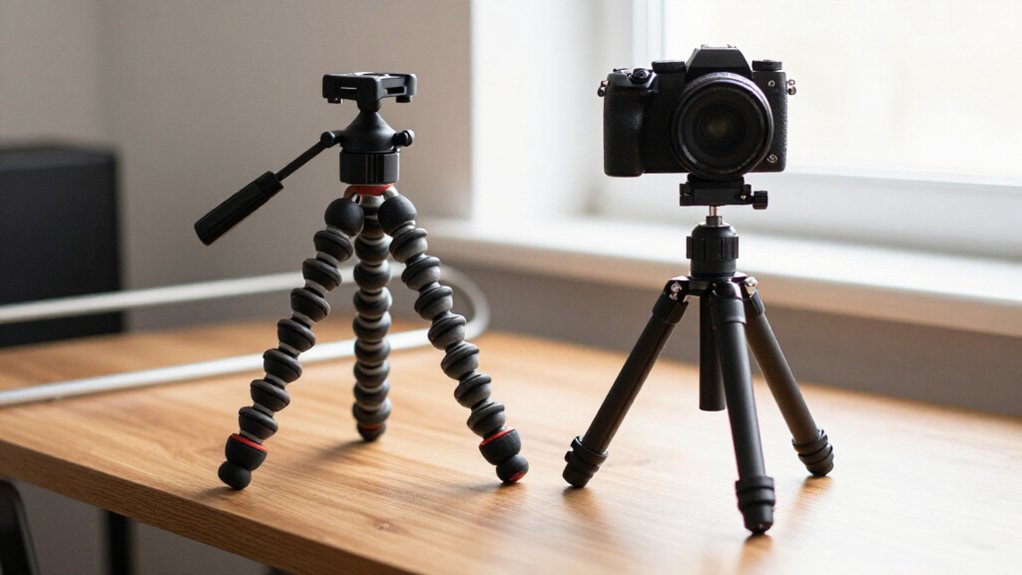
On a flat desk, you’ll usually get steadier framing from a tabletop tripod: its rigid legs and wide, low stance resist rocking.
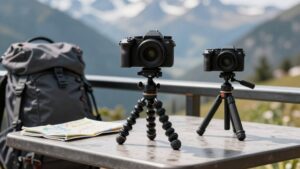
Choose a flexible tripod when you need to wrap legs around a pole or branch, or position your camera on uneven ground without a flat support.
Its grip depends on surface texture, so slick metal can cause sliding.
Check the load rating and gently test for drift before filming.
The sections below compare fit, setup, and stability.
Desk Stability vs. Surface Grip
On a flat desk, a tabletop tripod’s wide, low stance and rubber feet usually resist rocking better than a flexible tripod’s legs. That setup suits you when you place your camera on a solid desk and keep the center column low. Its feet prioritize steadiness, not clamping to objects.
A flexible model, such as the Joby GorillaPod 1K, can wrap around a pole or branch and support about 2.2 pounds, but its grip depends on contact texture; slick metal can let it slide.
| Use case | Better fit |
|---|---|
| Flat desk | Tabletop |
| Pole or branch | Flexible |
| Slick metal | Neither assured |
| Low-angle desk shot | Tabletop |
Choose flexible when you need to clamp onto irregular objects within its rated load; choose tabletop when a desk offers a level surface.
Leg Design and Mechanics
Through their leg mechanics, flexible and tabletop tripods achieve stability in different ways: flexible models use multi-jointed legs that bend around objects and often stay in position, while tabletop models use rigid segments that spread into a level, wide stance.
You can position flexible legs around poles or branches; the GorillaPod 1K uses eight-inch legs. Its hinges lock at many angles, though the multiple joints may feel less substantial than simpler tabletop structures. Grip comes from clamping contact and rubberized feet, but a low-friction attachment surface can let them slide.
Tabletop legs instead align through sturdy rigid segments. You get a flat base, with minimal center-column extension; its geometry and desk contact guide placement. You can adjust them without relying on wrapping mechanics.
Load-Bearing Stability Tests
When testing load-bearing stability, the GorillaPod 1K’s 2.2 lb (about 1 kg) rating trails the roughly 2, 8 lb (0.9, 3.6 kg) range common among compact tabletop tripods. That difference means a tabletop model generally supports heavier camera-and-accessory setups within its stated capacity.
To compare real-world performance, film steady video at portrait and landscape angles, then gently jostle your phone. Watch whether the head or legs move, or the entire base shifts; visible drift or oscillation signals instability. The GorillaPod depends on securely articulated legs around poles or branches, and it can slide on slick surfaces.
On a desk, a tabletop tripod’s wide, low stance and rubber feet resist wobble. Keep its center column low: raising it increases leverage and tipping risk. If added accessories exceed capacity, or the head moves slowly under load, reduce the load.
Setup Speed and Packing Convenience
For uneven locations, a flexible tripod like the 10.24-inch GorillaPod 1K can be ready quickly because its jointed legs wrap around poles or branches without requiring a flat spot. Tabletop tripods are faster on a desk: you can unfold and lock their wide, low stance, then place and align them in under 30 seconds.
On uneven ground, the flexible design can save re-leveling time; adjust or wrap its legs in place to keep your phone steady, while a tabletop model may need careful leg placement to hold the same angle.
Packing favors portability. The GorillaPod 1K kit collapses to roughly the size of a small water bottle and weighs about as much as a navel orange. A Pedco Ultrapod III folds to about 7.25 inches long, but tabletop models trade some compactness for a rigid, desk-first stance.
For grab-and-go travel, you’ll likely prefer the lighter flexible bundle; for quick desk setup, choose tabletop instead.
Phone and Camera Mount Fit
Mount fit determines how securely each tripod holds your phone and how quickly you can frame a shot. With a Ulanzi ST-27 on a Joby GorillaPod 1K kit, you can grip a phone in portrait or landscape without retightening. Its flexible legs wrap around posts or branches, letting you adjust framing.
The kit supports up to 2.2 lb (about 1 kg), enough for a smartphone and add-ons such as a microphone. Tabletop mounts often use magnetic or quick-release attachment, helping you center the phone and repeat angles. Their rigid setup and wide base favor stable desk shots; flexible legs offer placement options but may feel less rigid.
Check the mount’s phone-size range with your case on or off, and confirm it closes.
Warranty and Replacement Parts
Warranty coverage matters most at the parts that move or bear load: flexible-leg joints and phone clips on flexible tripods, or extendable columns and mounts on tabletop models. Check whether terms cover wear or failure in these components, rather than assuming all parts receive protection. Then compare parts availability: flexible kits may offer replacement leg segments or clips, while tabletop models may list center-column units, detachable heads, or quick-release mounts.
If a model uses a small ball head, confirm you can service or replace that interface; replacing a mount can cost less than replacing the legs. Also check rated capacity: exceeding a flexible kit’s roughly 2.2-pound limit, or a tabletop model’s 2–8-pound range, may void a claim. For support, favor brands selling spare assemblies.
Surface-Specific Grip Risks
Grip depends on both the tripod design and the surface beneath it: a flexible model such as the Joby GorillaPod 1K can wrap around branches or poles, but may slide on smooth ones, while a tabletop model relies on non-slip feet to stay secure on a flat surface.
On a slick pole, limited friction can let a flexible leg slip. A jostle may shift its mount before the camera settles. Tabletop rubber feet need a level, high-friction desk; even a breeze can cause wobble when contact is poor.
Minis sit low, about 4.2 inches in one Oben design, so an uneven bench can transmit shake. Place every foot on the firmest, flattest area. A load rating, such as GorillaPod 1K’s 2.2 pounds, doesn’t guarantee grip.
Portability and Storage Trade-offs
Compare packed size and weight to determine how each tripod fits your carrying needs. Flexible models fold to roughly bottle size but can weigh more than compact tabletop or fixed-stance minis.
Tabletop designs store flat and usually set up faster on desks, while flexible legs take longer to wrap and secure.
Packed Size and Weight
Flexible tripods often pack more compactly because their legs wrap around objects rather than folding into a wide, rigid stance: the Joby GorillaPod 1K measures about 10.24 inches from mount to foot. Dimensions alone don’t tell everything.
By comparison, the Oben TT-100 stands about 4.2 inches tall and folds to roughly 7.5 inches, but retains a fixed shape. An ultra-compact tabletop model such as the Pedco Ultrapod III folds to about 7.25 inches and weighs around 0.25 pound. Very small tripods commonly weigh 0.25 to 0.5 pound, so differences can be modest.
Larger flexible kits change the comparison: the GorillaPod 5K weighs about 1.63 pounds, reflecting its thicker, multi-joint legs. Reach also affects packed dimensions; the Sirui 3T-35K’s extendable center column adds bulk over desk-only designs.
Storage and Carrying Convenience
Beyond packed weight, storage depends on how each tripod fits around other gear. A flexible model such as the Joby GorillaPod 1K Kit folds to small-water-bottle size, with a 10.24-inch mount-to-foot reach. Its bendable legs can wrap around posts or branches, so you may leave extra clamps at home.
- A tabletop tripod packs into a shape; the Oben TT-100 stands 4.2 inches tall and folds to roughly 7.5 inches.
- For grab-and-go desk use, mini models often weigh 0.25–0.50 lb and pack flatter.
- The Pedco Ultrapod III folds to 7.25 inches, while taller tabletop designs can take more bag space.
- A flexible tripod stores by bending around itself, rather than occupying a rigid footprint, which can make it easier to fit beside other gear.
Low-Angle Macro Photography
For low-angle macro shots, a flexible tripod’s jointed legs can wrap around nearby supports, while a 4-9-inch tabletop tripod sits steadily on flat ground near your subject. You’ll reposition a mini tripod quickly in tight spaces, but flexible legs help when no stable surface is available.
Lock the phone mount firmly, keep the center column low, and disable image stabilization to reduce blur from micro-vibrations.
Getting Close to Subjects
When you’re shooting low-angle macro, a mini or tabletop tripod usually gets the lens closer to flowers, textures, and small objects because it sits near ground level, often under a foot tall. A flexible phone tripod such as the Joby GorillaPod 1K offers 10.24-inch reach and supports up to 2.2 pounds. Its bendable legs let you wrap the phone around a branch or pole when you can’t place a tabletop model beside the subject. Choose by access: tabletop designs put the lens low on nearby ground; flexible legs extend placement options but may slide on slick poles.
- Pick a tabletop model for nearby ground-level subjects.
- Wrap flexible legs around branches or poles.
- Confirm the 2.2-pound load limit.
- Expect slick poles to reduce grip noticeably.
Stabilizing Macro Shots
At ground level, a flexible tripod can stabilize low-angle macro shots where tabletop models, often just 5–8.7 inches tall, may not reach the needed position.
A Joby GorillaPod 1K extends 10.24 inches from mount to foot, so you can wrap its legs around a branch or pole and position your phone near the ground. Its 2.2-pound load rating typically supports a smartphone and small accessories without wobble during longer exposures. Use the rotating plastic ball head for small framing adjustments; you can keep the legs planted after placement.
Tabletop tripods suit desks, but their shorter height limits ground-level positioning away from a surface. For sharper macro images, avoid slick contact points such as poles, and lower the center column fully if your setup includes one.
Flexible vs. Rigid Legs
Although flexible legs can wrap around branches or poles for low-angle macro shots, rigid tabletop legs usually deliver steadier results on flat ground. On flat surfaces, a wide base and low center of gravity reduce micro-vibration, helping you capture sharper close-ups.
- Flexible legs let you place the camera on uneven ground or non-flat perches.
- Wrap joints around branches or poles for perspectives a tabletop tripod can’t easily reach.
- On slick supports, rubber foot grips help prevent sliding; joints must hold tension.
- Rigid legs’ wide base and low center of gravity reduce micro-vibration on flat surfaces.
If you need near-tabletop framing, mini rigid models can lower to about one or two inches, giving you a repeatable stance; flexible legs often need repositioning between shots.
Choosing Between GorillaPod and Desk Tripod
For flexible placement, a GorillaPod can wrap around poles or branches for low-light time-lapses; its legs adjust to varied positions, and the GorillaPod 1K kit supports up to 2.2 lb with about 10.24 inches of mount-to-foot reach.
Choose it when you need to reposition across varied surfaces or mount your phone for a low-light time-lapse. Its 2.2-lb capacity suits many light smartphone setups without heavy accessories, but flexible legs may feel less rigid and can slip on slick poles.
A desk tripod is the better choice when you want a repeatable product or YouTube frame. Its fixed, wide stance sits rigidly on a flat surface, typically at about 4–9 inches, and reduces wobble for sharper shots with less adjustment. Choose it for quick desk setups and consistent framing.
In short, prioritize the GorillaPod for grip-anywhere placement; choose a tabletop model for steadiness and convenience on your desk. Neither option replaces checking payload limits or tightening each connection before recording each time.
Conclusion
Choose a flexible tripod when you need to wrap legs around rails, branches, or uneven supports; choose a tabletop tripod when you need a compact, repeatable base on a desk. You’ll trade faster placement and firm surface stability for broader positioning options and more setup checks.
Match the tripod’s rated load and mount to your phone or camera, then test grip on the actual surface. For macro work, prioritize low-angle reach without sacrificing reliable support.