How Does a MagSafe Tripod Mount Work? Hold Strength, Limits and Tips
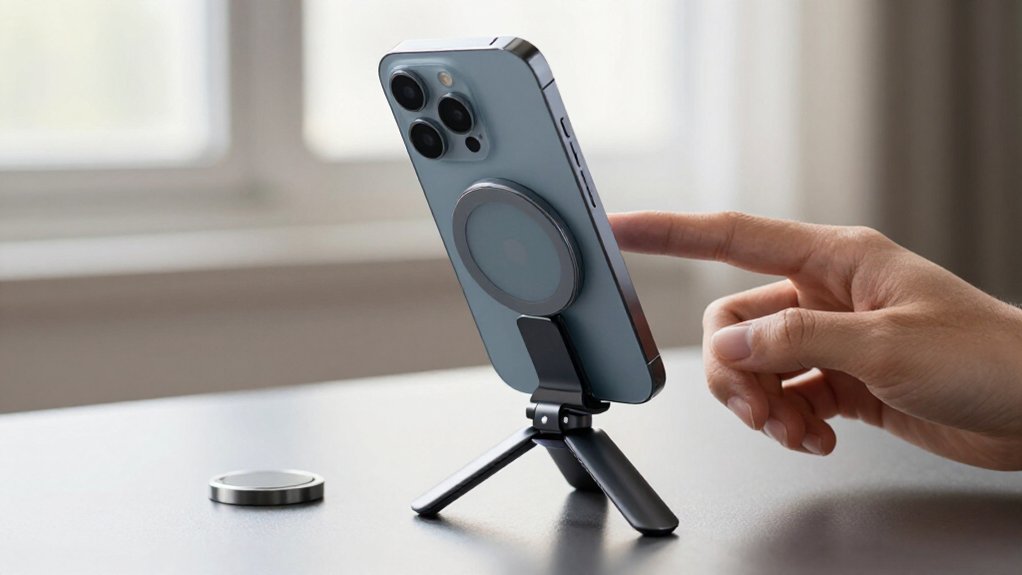
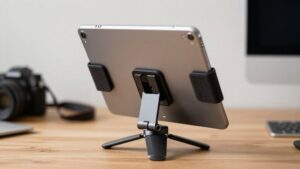
A MagSafe tripod mount uses magnets to snap your phone into position; it isn’t suction. Hold is strongest when the phone sits flush against the mount, since a case gap or misalignment weakens magnetic overlap. Tilt adds torque, so attachment alone doesn’t prove stability.
Test your setup in portrait and landscape, tilting the head; watch for rotation or edge lift. Keep wallets clear and secure the tripod. More checks can help you prepare for shoots.
Magnetism Isn’t Suction
A MagSafe tripod mount holds your phone with embedded neodymium magnets, not vacuum suction. The magnets, often N52, provide about 14 newtons of pull force. This force draws your phone into a centered position with a snap, but it doesn’t lock the mount against every movement.
Keep the phone centered and flush against the mount to preserve magnetic contact. As you tilt the phone, gravity creates a twisting moment as well as a downward load. The magnets can resist sliding more effectively than rotation.
Since torque is applied, it matters: a small adjustment may hold, while repeated angle changes can make the phone slowly rotate, sag, or separate during movement. If that happens, treat it as a mismatch between magnetic force and leverage, not as suction failure. Reduce tilt or reposition the phone before continuing.
The Case-Gap Effect
Even when the magnets align correctly, a case can weaken their hold by keeping the phone from sitting flush against the mount. A case adds separation between magnetic rings, reducing effective pull; slight clearance matters because these systems rely on close, flat contact after snap alignment.
Designs cite 14 N from N52 magnets when aligned, but that figure doesn’t guarantee hold through every case. Thick or nonmagnetic materials can alter how the field concentrates and centers over the mount. Under leverage, your phone may tilt, edge-lift, or slowly rotate as orientation shifts the load across a gap.
Remove wallets or grips, and choose a case that lets your phone rest flat in portrait and landscape. If it can’t sit flush, use threaded or mechanical support.
Field-Testing the Magnetic Hold
To test the magnetic hold, install the complete case-and-mount setup with no wallet or grip between them, then check that the phone stays centered and flush, not merely that it snaps on. Test in both portrait and landscape while you slowly change the tripod-head angle. Watch for gradual rotation, an edge lifting, or the phone settling out of level; these shifts can reveal a weak hold before a drop.
Don’t stop at a desk test: move the tripod lightly and check for sagging or separation under gentle motion. If you’ve added an adhesive MagSafe adapter, let its adhesive cure for 24 hours before filming.
Treat every pass as specific to that case, mount, and phone configuration. A published force rating, such as roughly 14 N for N52 magnets, can’t predict safety across case thickness, accessory leverage, and tilt. Recheck after changing any part of the setup. Repeat the check before shoots, especially after repositioning the phone.
Magnet Ring Layout
Your phone’s fixed magnet ring must align with the tripod mount’s centered magnet disk for a strong hold. Even slight miscentering reduces field overlap, while a flush, unobstructed contact helps prevent slipping or rotation.
The magnets’ arrangement and polarity determine how the mount seats against the ring.
Ring Alignment
At the center of a MagSafe tripod mount, multiple N52 neodymium magnets form a ring that helps the phone snap into repeatable alignment. That fit depends on overlap between your phone’s internal magnet array and the mount’s contact area. The ring helps center the phone and keep its back flush, but it doesn’t guarantee maximum holding strength with every case or tripod angle.
A bulky or uneven case can shift the interface, reducing effective grip. Check that the phone sits flat and centered before tilting the tripod. Around the center, even a small sideways offset can let the phone rotate slowly under tilt. That movement signals partial ring overlap, not secure, full contact. Raised case edges or accessory layers can prevent flat, uniform contact.
Magnet Arrangement
A MagSafe tripod mount arranges N52 neodymium magnets in a ring matched to the phone’s or case’s alignment disk. Its spacing and magnet count determine how evenly the mount pulls across the contact area and resists torque. If one side engages less firmly, the opposite edge can lift, allowing the phone to rotate slowly under load.
Treat published holding figures, often about 14 newtons for N52 designs, as conditional, not guaranteed: they assume the intended configuration, with the phone’s back glass flush against the mount. Test your setup in portrait and landscape; each orientation changes leverage, so edge lift or drift may appear in only one. Check even engagement around the perimeter before adding accessories, since added load magnifies small imbalances during a test.
Centering and Polarity
Evenly spaced magnets help distribute pull, but the ring’s polarity and position determine whether the phone centers on the mount.
A MagSafe tripod mount uses a multi-pole N52 neodymium ring that mates with your phone’s magnets, guiding it over the contact area. If you flip or rotate your phone, or use a case with a different magnet layout, the mount may sit crooked and pull unevenly.
On a non-MagSafe device, center the adapter ring high; an off-center ring can let alignment drift after a click. Test alignment in portrait and landscape, since tilting increases leverage and can magnify mismatch. Keep the case edge from blocking flush contact: a centered snap won’t guarantee a tripod hold if the coupling gap weakens magnetic force.
Portrait Versus Landscape Loading
In portrait, your phone’s center of mass creates more torque, so imperfect centering can cause rotation or edge lift. Landscape loading usually presses more evenly against the magnetic contact plane, reducing visible sag from small alignment errors.
To prevent rotation, center the phone, keep the case interface flat, and check for drift as you tilt the tripod.
Portrait Load Balance
Portrait orientation usually puts a MagSafe-mounted phone at its least stable balance point: the top-heavy load creates more torque and can slowly rotate off center, especially as you tilt the tripod head and the magnetic interface takes changing shear and peel forces. Check the phone stays centered and flush against the mount before recording.
A strong initial snap doesn’t guarantee stable portrait support: a raised case edge or off-center ring can reduce effective contact and let the phone sag or lift at an edge. Test with the exact case and accessories you’ll use, then tilt the head through your planned angles. Watch for gradual drift or changing alignment, not just detachment. Landscape may remain steadier, but don’t assume desk-top positioning predicts performance in portrait.
Landscape Torque
Orientation changes how gravity loads the MagSafe interface: landscape places more of the phone’s center of mass beneath the disc, reducing the tendency to peel an edge away. In landscape, gravity loads the magnets more directly. In portrait, the phone sits top-heavy, creating a longer lever and greater torque.
That load can cause slow creep and gradually shift the magnetic interface off center, especially when your case doesn’t sit flush. Static pull strength won’t capture that difference. A commonly cited N52 system may provide about 14 N of holding force, but that figure describes pull strength, not resistance to twisting.
When you tilt the tripod head, portrait orientation can make the phone sag, tilt, or settle out of level, even if it held firmly on a desk. Check both orientations with the exact case and accessories you’ll use; imperfect alignment can increase rotational stress.
Preventing Phone Rotation
Although N52 magnets snap the phone into the mount’s center, they won’t prevent rotation if the phone or case doesn’t sit flush. Portrait loading creates greater torque: a tall center of mass and uneven case thickness encourage rotation. Quick attachment doesn’t prove stability. Check alignment under changing load:
| Check | Portrait | Landscape |
|---|---|---|
| Torque | Higher leverage | Often reduced |
| Fit | Confirm flush contact | Confirm flush contact |
| Test | Tilt head gradually | Tilt head gradually |
| Warning | Edge lift or drift | Passing doesn’t prove portrait stability |
Tilt your tripod head gradually in both orientations; watch whether the phone stays centered and level. Don’t rely on a desk test or landscape success alone. In portrait, edge lift, level drift, or slow settling during movement shows your phone-and-case combination isn’t seated securely to resist rotation. Reseat it or change the case or mount.
Low-Light Time-Lapse Shooting
For low-light time-lapse, secure the phone through the tripod’s 1/4”-20 threaded connection; let the MagSafe magnets position it, not support its stability. Before capture, test your exact phone-and-case combination in portrait and landscape. Frame the scene, then check that the phone doesn’t slowly rotate, sag, or lift off-edge; even slight drift can break continuity across a long sequence.
If you tilt the head, place the tripod on a stable surface and verify that nothing moves before starting a multi-hour recording. In dark scenes, longer exposures or higher ISO make footage more sensitive to micro-vibrations, so avoid adjusting the tripod mid-sequence. Add a small constant LED when practical, and choose a repeatable exposure interval to limit distracting frame-to-frame brightness swings across the final sequence.
Adhesive Ring Peel-Off Risk
When a MagSafe-style ring is tilted or offset from the phone, the mount acts as a lever and concentrates peel stress at the adhesive’s edges. An initial magnetic snap doesn’t prove the adhesive bond is secure: as your phone sags, the ring rotates, or an edge lifts, the mount keeps applying shear and peel forces that can gradually loosen the bond.
Let a ring cure for about 24 hours before loading it; testing or mounting it sooner can trigger edge failure. For lower peel risk, keep the phone centered and flat on a desk rather than using portrait or angled positions, which increase rotational force at the offset contact point. Check for lifting or rotation before a session, and stop using the mount if one appears.
Wallet Inserts Weaken Magnetic Grip
A wallet insert between your phone and a MagSafe tripod mount can prevent a centered, flush snap, reducing magnetic hold and increasing edge-lift risk. Even slight offset can move the magnets outside the mount’s contact zone; portrait orientation adds gravity’s tilt moment.
- Remove detachable wallets and cards before testing; a bare-phone attachment doesn’t predict performance with the insert installed.
- A thick layer adds leverage, turning partial contact into peel and torque stress instead of shear.
- Check both portrait and landscape; portrait use is especially vulnerable to edge lift and gradual rotation.
- Reject the setup if your phone sags, slowly rotates, or separates during gentle movement.
Treat a wallet as unknown risk; don’t trust a snap alone, and reject any movement under gentle handling.
Check Case Compatibility
Before relying on a MagSafe tripod mount, test it with your exact case and expected accessories installed, but remove any wallet, grip, or card between the phone and mount. Check that the case lets the magnetic interface sit centered and flush over the mount’s contact area. A raised case edge can leave the phone tilted or prone to sag.
Recheck carefully in both portrait and landscape; watch closely for rotation, edge lift, or settling out of level. Printed force ratings, such as 14 N for N52 magnets, apply only to their stated configuration; case fit and geometry can reduce stability. If gentle movement causes rotation, tilt, sag, or separation in the orientations you’ll film, reject the combination and use threaded or mechanical support for safety.
Conclusion
Treat a MagSafe tripod mount as a magnetic coupling, not a suction cup: every extra layer between your phone and mount reduces holding force. Check your case, remove wallet inserts, and test the grip in both portrait and landscape before you shoot.
Keep the phone close to the mount’s center, especially during low-light time-lapses, and avoid relying on adhesive rings unless they’re firmly bonded. A careful compatibility check helps prevent slips, drops, and ruined footage.